omarcoaraujo/tint
Terminal string styling library for Luau


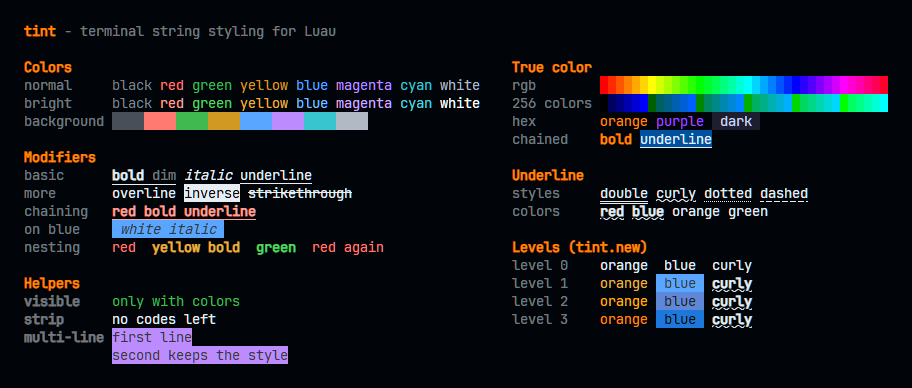
Features
- Fluent chainable API —
tint.red.bold.underline("text") - Nested styles with automatic color restoration
- True color RGB and hex support with automatic downgrading per terminal capability
- Automatic terminal color level detection (respects
NO_COLOR,FORCE_COLOR,COLORTERM, etc.) - Runtime agnostic — works with Zune, Lune, and Lute
- Zero dependencies
Installation
Add Tint to your pesde.toml:
[dependencies]
tint = { name = "omarcoaraujo/tint", version = "^0.2.1" }
Then require it:
local tint = require("@pkg/tint")Usage
Basic colors
print(tint.red("ERROR"))
print(tint.green("SUCCESS"))
print(tint.yellow("WARNING"))
print(tint.blue("INFO"))
print(tint.cyan("note"))
Modifiers
print(tint.bold("bold"))
print(tint.italic("italic"))
print(tint.underline("underline"))
print(tint.dim("dim"))
print(tint.strikethrough("strikethrough"))
Chaining
Styles can be chained in any order:
print(tint.red.bold("red and bold"))
print(tint.blue.bold.underline("important"))
print(tint.green.italic("success"))
Nesting
Outer colors are automatically restored after inner styled segments:
print(tint.red("error: ", tint.yellow("detail"), " continues in red"))
print(tint.bold("BOLD ", tint.underline("BOLD+UNDERLINE"), " BOLD again"))
True color (RGB & Hex)
print(tint.rgb(255, 136, 0)("orange"))
print(tint.hex("#ff8800")("also orange"))
print(tint.rgb(255, 136, 0).bold("bold orange"))
print(tint.bold.hex("#ff8800")("also bold orange"))

-- Background
print(tint.bg_rgb(30, 30, 46)("text on dark bg"))
print(tint.bg_hex("#1e1e2e")("text on hex bg"))
On terminals that do not support true color, RGB and hex values are automatically downgraded to the nearest 256-color or 16-color equivalent.
256-color codes
print(tint.ansi256(200)("pink"))
print(tint.bg_ansi256(200)("pink background"))
At color level 1 the codes are downgraded to the 16-color palette.
Underline styles and colors
print(tint.underline_curly("curly"))
print(tint.underline_double("double"))
print(tint.underline_dotted("dotted"))
print(tint.underline_dashed("dashed"))

print(tint.underline_curly.underline_red("red curly"))
print(tint.underline_curly.underline_bright_blue("blue curly"))
print(tint.underline_rgb(255, 136, 0)("orange underline color"))
print(tint.underline_hex("#ff8800")("same, from hex"))
print(tint.underline_ansi256(200)("256-color underline color"))
The underline color only shows when an underline style is also applied. Terminal support varies (Kitty, WezTerm, VTE, Windows Terminal, iTerm2).
Visible
visible only prints when colors are on, and returns an empty string otherwise:
print(tint.visible.dim("only with colors"))Strip
Removes every ANSI escape code from a string:
print(tint.strip(tint.red.bold("plain")))Multi-line text
Styles are closed and reopened around each line break, so every line keeps its style:
print(tint.bg_red("first line\nsecond line"))Background colors
print(tint.bg_red("red background"))
print(tint.bg_green("green background"))
print(tint.red(tint.bg_white("red text on white background")))
Color level detection
Tint detects color support automatically at startup and adapts all output accordingly.
| Level | Description | Triggered by |
|---|---|---|
0 | No colors | NO_COLOR, TERM=dumb, pipe / non-TTY |
1 | Basic 16 colors | Most terminals, CI environments |
2 | 256 colors | TERM=xterm-256color |
3 | True color (16M) | COLORTERM=truecolor, Windows Terminal, iTerm 3+ |
Fixed level
tint.new creates an independent copy locked to a level, ignoring the terminal:
local basic = tint.new({ level = 1 })
print(basic.hex("#ff8800")("always 16 colors"))

local plain = tint.new({ level = 0 })
print(plain.red("never colored"))
Without a level, the copy uses the detected one.
Overriding
FORCE_COLOR=0 zune run script.luau  # disable all colors
FORCE_COLOR=1 zune run script.luau  # exactly 16 colors, even on Windows
FORCE_COLOR=3 zune run script.luau  # force true color
NO_COLOR=1    zune run script.luau  # disable per no-color.org spec
Or via CLI flags:
zune run script.luau --no-color     # disable colors
zune run script.luau --color=256    # force 256 color mode
Runtime compatibility
Tint works across Luau runtimes with automatic detection:
| Runtime | Color support | TTY detection |
|---|---|---|
| Zune | Full | Yes |
| Lune | Full | No (assumes TTY) |
| Lute | Full | No (assumes TTY) |
License
MIT