cameronpcampbell/supercorner
A Figma-inspired alternative to Roblox's UICorner.
Supercorner
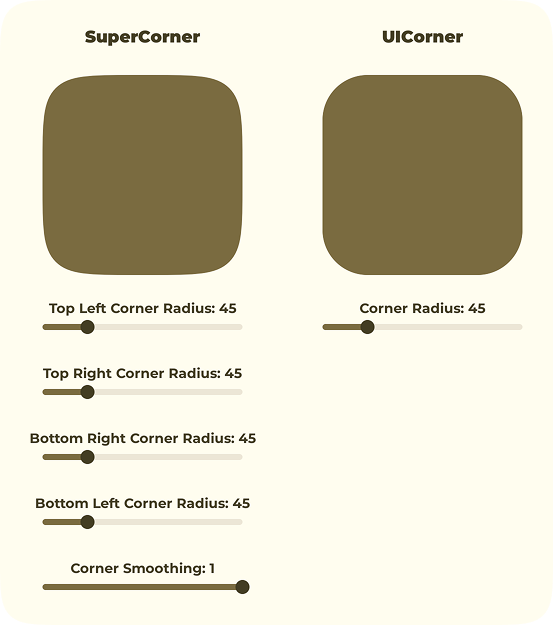
A Figma-inspired UICorner alternative for Roblox.
Benefits to Supercorner:
- Supports individual corner radii.
- Supports corner smoothing (squircles).
Disclaimer
This library is not an official product from the Figma team and does not guarantee to produce the same results as you would get in Figma.
This is a Roblox/Luau fork of phamfoo/figma-squircle. Big thanks to the original creator.
Installation
Add Supercorner to a pesde project that targets Roblox:
pesde add cameronpcampbell/supercorner
pesde install
Or add it directly to pesde.toml:
[dependencies]
supercorner = { name = "cameronpcampbell/supercorner", version = "^0.1.1", target = "roblox" }
Roblox projects must configure a roblox_sync_config_generator. When initializing a Rojo project with pesde init, select pesde/scripts_rojo as the scripts package.
Usage
local Supercorner = require(path.to.Supercorner)

local Squircle = Supercorner.new({
	CornerRadius = 24,
	CornerSmoothing = 0.6,
})

local ImageLabel = Instance.new("ImageLabel")
ImageLabel.ImageContent = Squircle:GetContent()
ImageLabel.ScaleType = Enum.ScaleType.Slice
ImageLabel.SliceCenter = Squircle:GetSliceCenter()
ImageLabel.SliceScale = Squircle:GetSliceScale()
ImageLabel.Size = UDim2.fromOffset(200, 200)
ImageLabel.BackgroundTransparency = 1
ImageLabel.Parent = SomeParent

-- Clean up when done
Squircle:Destroy()
Sizing
Supercorner automatically calculates the image size from the corner radii. There is no need to specify a width or height manually.
For redrawable supercorners, MaxCornerRadius (or the per-corner variants MaxTopLeftRadius, MaxTopRightRadius, MaxBottomRightRadius, and MaxBottomLeftRadius) controls the image size. These values define the largest radii you intend to use. Without them, the image is sized for the initial radii.
Static, non-redrawable supercorners are always sized from their initial radii.
If a redraw exceeds the configured maximum radii, the radius is clamped and a warning is emitted.
Static Content
By default, Supercorner converts the rendered image into static content using CreateDataModelContentAsync. This frees editable memory when a supercorner does not need to change after creation.
This requires the Enable Mesh/Image to static content conversion API beta feature. If the feature is not enabled, Supercorner automatically falls back to keeping the EditableImage alive.
Redrawing
To update a supercorner after creation, pass Redrawable = true:
local Squircle = Supercorner.new({
	CornerRadius = 24,
	CornerSmoothing = 0.6,
	MaxCornerRadius = 48,
	Redrawable = true,
})

ImageLabel.ImageContent = Squircle:GetContent()
ImageLabel.ScaleType = Enum.ScaleType.Slice
ImageLabel.SliceCenter = Squircle:GetSliceCenter()
ImageLabel.SliceScale = Squircle:GetSliceScale()

Squircle:Redraw({
	CornerRadius = 32,
	CornerSmoothing = 0.8,
	TopLeftRadius = 16,
	TopRightRadius = 16,
})

ImageLabel.ImageContent = Squircle:GetContent()
ImageLabel.SliceCenter = Squircle:GetSliceCenter()
Calling :Redraw() on a non-redrawable supercorner throws an error. Only use Redrawable = true when runtime updates are required, because editable images consume editable memory.